Posts

Installing Tor Brower on debian

Image
Tor Browser If you have searched this page its simply mean that you are trying to setup a browser that give you a lot freedom and also your gateway for the dark web. Yes you are correct I am talking about Tor browser.  Installation is very much focus on debian linux, as you know ubantu, debian or kali all are the different version of the debian hence commands provided here will work for all the linux. Open the linux command prompt     >> apt-get install torbrowser-launcher    Once you give this command you can see an browser installation process will start and it will show the below window for the download process. Once its finish you can open the tor browser. its not recommanded or allowed to install or use tor browser with root user hence better you connect with  your own user and run the command. Once its installed run the following command to run a tor browser. torbrowser-launcher --detach It wi...

Jet Integration With Rest

Image
JET integration with Rest Oracle jet is next set of UI technology provided by Oracle, its a complete framework which is been written in java script.   Being on ADF technology now its must for you to start learning Oracle Jet technology.  I have started a bit and sharing my experience and projects, which I worked on.   Jet SO far does not have any technology which can directly communicate with the database or datasource, hence its heavily dependent on the services for the interaction. So far my knowledge is limited to Rest services.  In this example i have shown how you can integrate a 12c ADF service with the Oracle Jet. ADF Application (Rest Source)  I have created a small project (ADF 12c) which you can download from the link.  This project use oracle rest dataconrol (new in 12c) and expose department table as a rest service to view. Cross Domain Access   In ADF security does not allow to access one application from some other...

Using Java Decompiler(JD) with Oracle Jdeveloper (Jdev)

Image
  Java Decompiler(JD) with Oracle Jdeveloper (Jdev) Java Decompiler is a good tool to check the code, when we just have complied code.  There are ways by which you can check the code, which is been in form of jar with you.   Let say you got ADF Jar file for a project and now want to check, what is the code inside of an entity object IMpl or how this code is structured.  There are some simple steps to it. 1. Create an ADF application with mode and UI project. If you have more project, try to keep the name of the model same as jar. Here I have two jars to check. employee Model.jar and employeeUI.jar.   2. Now go to you jars and then unzip these jars using the unzip or 7 zip prog. 3. Once you done with the unzip then place these directries under the application and project you have created. Please have model code paste under src directory only. 4. Refresh the application now and you will be able to see ...

ADFUTIL Class

ADF Util Class This class is very much useful and from here and there I copy most of the methods and use almost in all the UI projects.  I am adding this to my blog to have a reference so that we need not to search all the places. Create a java class in your ADF UI project name ADFUtil and then copy the below content.  This class have some very important methods   1.  saveAndContinue :-   This method save the current frame and allow you to continue working on the frame.  2. evaluvateEL:-      This method used to get the value of the, el expression, like the employee name or any other value which is there in the page. 3. ExecuteEL     This is to execute the a method, with or without parameters. 4. SetEL    This to set the value of the El-expression. ===================== Class Starts ===================== import java.util.Map; import javax.el.ELContext; import javax....

Current Logged in User and Roles in ADF and Fusion Apps

A) Using the groovy Expression. We can set default expression in view object attribute as below  adf.context.securityContext.getUserPrincipal().getName()  adf.context.securityContext.getUserName()    For Roles use  adf.context.securityContext.getUserRoles() B) Java Code You can get User Name in Java code also using the following code. ADFContext adfCtx = ADFContext.getCurrent(); SecurityContext secCntx = adfCtx.getSecurityContext(); String user = secCntx.getUserPrincipal().getName(); String userName = secCntx.getUserName(); String[] Roles = secCntx.getUserRoles(); C) Expression  Language You can bind ADF Faces componenets with the following EL to get logged User Name. #{securityContext.userName} #{securityContext.userRoles} D) In Fusion Applications (On Premise Implementation) ApplSession session = ApplSessionUtil.getSession(); String guid1 = session.getUse...

Using Database sequence in the ADF for primary key attribute.

Image
There are multiple ways to use DB sequence in the ADF for generating ids. 1. Use the column as DB sequence and  mention the sequence name in the sequnce name filed. Post that ADF will take care of executing the sequence.    ADF framework will add a temporary negative number until you commit the information. 2.  Use SequenceImpl in the Adf, this can be used at mutiple places, this can be used    -- Create method.    --  Do DML method. ===============================================         SequenceImpl seq = new SequenceImpl("MSKILL_LOV_GEN_SEQ",this.getDBTransaction());                 Integer nextVal = Integer.parseInt(seq.getSequenceNumber().toString());                 this.setLovValueId(nextVal);          ...
 Tricky Error  oracle.jbo.expr.JIEvalException: JBO-25077:  If you are gtting this error  JBO-25077: Name ***sVO not found in the given object: ViewRow [oracle.jbo.Key[300000008822036 ]].     at oracle.jbo.common.JboBeanUtils.getProperty(JboBeanUtils.java:95)     at oracle.jbo.common.JboBeanUtils.getPropertyInMapOrBean(JboBeanUtils.java:252) This normally will be coming from the destination view accesssor. Open this View Object  and  go in the end and see if something is not coming in the warning.   <ViewLinkAccessor     Name="BookVO"     ViewLink="xx.test.view.link.bookToTopics"     Type="oracle.jbo.Row"     Reversed="true"     IsUpdateable="false"/> If  Viewlink is correctly created jdev can auto correct also. Correct and rerun your application Most of the cases error will be gone.

Oracle Fusion TCA Concept

There are some queries, which is mostly we need in TCA 1. Get the contact information for a party or account in Oracle Fusion applications. SELECT PartyPEO.PARTY_NAME,   PartyPEO.EMAIL_ADDRESS,   OrganizationContactPEO.JOB_TITLE,   OrganizationContactPEO.DEPARTMENT,   PartyPEO.STATUS AS STATUS1,   CustomerAccountContactPEO.CUST_ACCOUNT_ROLE_ID,   CustomerAccountContactPEO.CUST_ACCOUNT_ID,   CustomerAccountContactPEO.CONTACT_PERSON_ID,   CustomerAccountContactPEO.STATUS,   CustomerAccountContactRolePE1.CUST_ACCOUNT_ROLE_ID AS CUST_ACCOUNT_ROLE_ID1,   CustomerAccountContactRolePE1.RESPONSIBILITY_ID,   CustomerAccountContactRolePE1.RESPONSIBILITY_TYPE,   CustomerAccountContactPEO.ROLE_TYPE,   PartyPEO.PARTY_ID,   RelationshipPEO.OBJECT_ID,   RelationshipPEO.RELATIONSHIP_REC_ID,   RelationshipPEO.OBJECT_TYPE,   RelationshipPEO.RELATIONSHIP_CODE,   RelationshipPEO.RELATIONSHIP_ID,   Organizat...

Oracle VM is throwing error, while importing.

I was trying to use the SOA VM given by oracle for Release 7.0,  but after downloading almost 9 GB stuff I got a wearied issue from the VM it was throwing error the access is denied on the VM. After some analysis I decide to move the VM from my document to a folder which is directly created in C drive after doing this I got some relaxation  from the error, but it was still some error which was chasing me. I will still getting some error for the VM, which was not clear to me, first thing I try by downgrading the VM player to version 4.0. After doing this also I was getting error like value in the tagname is wrong. Then I corrected the error and written the complete file for the reference.   But  the pain does not go away. The noticed one issue with my configuration that I am trying to use the VM Player from the VM ware site while Oracle them-self provides the VM player. Issue resolved once i start using VM play of Oracle there are multiple  sites I ...

filtering the SelectOncChoice in backing bean

In many times, when BC4J layer is not there in picture, we may need to filter the  values coming in the selectOneChoice in the bean. for this First we need to fill the first we need fill the values in the selecteItems from the bean            <f:selectItems value="#{BackingBean.subSelectItems}" id="si1"/> // this method will fill values in the list     public List<SelectItem> getSubSelectItem() {             // Collection to display              List<SelectItem> selectItems = new ArrayList<SelectItem>();                // Iterator on which list is based.         DCIteratorBinding listIterator =(DCIteratorBinding)ADFUtils.findIterator("ListIteratorInBindings"); ...

Some simple issues with SOA.

While working with the database adapter, we came across with some strange issue, Problem was our table which we was using to select the record using the database adapter was not not having any primary key and the key which we was we have selected was not unique. Now we faced the problem that the number of records was coming correct but adapter some how repeating the first record. Tried a number of things but till we declare the primary key to a unique column it was not corrected. =================================================================

SOA Basic - How to turn on debugger mode.

Image
I am trying to write some very basic features or options available for the SOA on weblogic server. These options are yet quite small but can provide a lot of help while debugging our composite. I will take on some simple composite after it. There is a option available with the SOA em console, you can change the mode of the server running to the development and ask the server to collect the state of the composite.  Its a small option but yet very helpfull while developing the SOA artifacts. Once your weblogic with SOA support is installed, go to the enterprise manager http://<Host:Port>/em/ enter the user name and password as weblogic/weblogic1 if not changed, these are usually the password you give during the weblogic domain creation. Then click on soa-infra, in my case if you are following my guide line to create the SOA server, it running in one server only.  Once its render click on the Soa Administrator and the go to common properties and click. ...

Simple terms you should know in financials

B2B ------------------------------------- This term is very frequent in the ERP, its refer to the transactions done by one business entity to other business entity. Like a tv manufacturing company is buying chip-set from one company and picture tubes from other company. These all are the example of the B2B transactions. B2C ------------------------------------- This term is less frequent in business world but irony is revenue comes from these transactions only. B2C refers to the transactions done between a legal business unit and customer. Like selling a tv to customer. B2G --------------------------------------------- Its refers to the transactions done between the businsess entity and Government. Simple terms its refers when a business entity do business with the government, or when customer of the business unit is government.  Now question may come B2C and B2G are almost same, yes both are almost same but the way business in these two handles a...

Executing a method bindings In Bean method.

Image
Many time you be in a situation where there is a AM method exposed as a client and requirement is to execute that AM method from the backing bean. Its quite simple first you have to register that AM method in the page definition file as method bindings. Now choose the method you want to add to the page definition and executed by a bean method. for the parameter either you can use the bindings if your parameter clearly coming from bindings else leave them blank. Now in the bean method first you have to catch the handle of the DCBindingContainer and then using this binding container you can get the operation binding for the AM method and then can add the parameter. If you are have already bind the parameter with the bindings then can skip that. then you just need to call the execute method of your operation binding.

Creating rows in parent and child VO connected using a VL

Hi, Today I got stuck with the requirement where I had to display the parent and child in the input mode. My problem was I am having two VOs both are connected to each other using a view link and both are having the id column. This column is a primary key for the Employee table and foreign key for the Description table which in tern also have a id column. so my database schema is like this. EQUITY_USERS Name Null Type ------------------- -------- -------------- USERID NOT NULL NUMBER USER_NAME NOT NULL VARCHAR2(20) FULL_NAME VARCHAR2(20) ACTIVATION_FLAG NOT NULL VARCHAR2(10) DEACTIVATION_REASON VARCHAR2(2000) ADMINUSERID NUMBER LAST_UPDATED_DATE NOT NULL DATE ...

Date Effective property of VO.

Image
Some time we have come to scenarios when the validatity of the row is dependent over a column value of date type. A typical example of this is contractual employees, if the contract date is over we may not be interested these employees for the payrole. ADF provides a property effective date for this use case. Its quite easy to implement and in the VO by just setting a flag we can ignore these rows. For this example we are using default HR schema of the XE database, we will create a new table as the existing table does not solve our purpose. create table CONTRATUAL_EMP as select * from employees; alter table CONTRATUAL_EMP add (CONTRACT_END_DATE DATE); update CONTRATUAL_EMP set CONTRACT_END_DATE = sysdate -10 where mod(employee_id,2) =0; update CONTRATUAL_EMP set CONTRACT_END_DATE = sysdate + 200 where mod(employee_id,2) =1; commit; Now table is ready, We are moving to to project. please download the project from the link . Open this project and then run the page DisplayResult.jpx. No...

ADF Simple Questions

Image
Managed Vs Backing Bean This question is almost asked in every jsff interview but yet there is quite confusion between two, I am putting down the difference between two 1. Managed bean will always be initiated and registered by adfc-config.xml. 2. Managed bean may have bindings for a number of components scattered though the project while Backing Bean must have the bindings only for a single page. 3. Scope of the backing bean will always request, while managed bean can be some of the different scopes. 4. Backing bean can be generated and self updated by option expose binding while creating a page. Jdev itself will add the binding of each component when you add it on page. 5. Backing bean most of the time overhead to the project as unnecessarily every binding is exposed. Logs in jdev (Integrated Weblogic) In jdev if debugger is on then a lots of logs are generated by jdev. Now sometimes if user want to go throw the logs or want to parse the logs then we can use inbuilt feature of the j...

Creating Weblogic Domain with SOA support.

Image
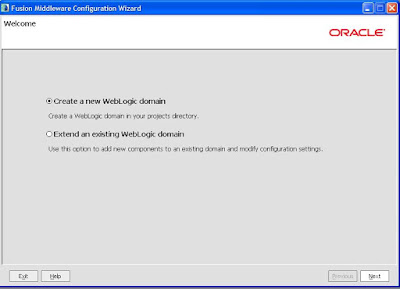
This is the final post in continuation for the creation of the weblogic domain with the SOA support. In last two post I described component required and placement of the each artifact required for the creation of the SOA server. Now everything in place and we can start building a server which will support soa. There are two ways a SOA server can be configured 1. All in one Admin server 2. Soa server as a managed server to Admin server. In weblogic we can create a number of managed server under a admin server each of these managed server are like different serving point. In a cluster environment two or more managed server worked as a single unit, to increase availability. Each managed server can be controlled from Admin server and while startup it takes all the configuration related information from the Admin server. While for the study purpose its better to have a all in one admin server which take less resource to run and require less steps to shutdown or start, which we must have to ...

Current Date in ADF.

Image
In adf a number of places you want to set the currentDate as a default parameter, you can use the groovy expression to set this. Like for a bind parameter if you want to set the default value use the value option and set the currentDate from the adf. In case if you want to set the value less then 10 days to current date you can use it adf.currentDate -10. This will give you date 10 days less then current date. If you want date and time both you can use adf.currentDateTime. In some of the cases you may need to execute the custom methods defined in your entityImpl then you need to use adf.object for that. Like in the below case if a custom method has been coded in the entityImpl to get the default value like getDefaultDepartmentCode. If you need to set the same for your variable you need to use it adf.object.getDefaultDepartmentCode

Oracle Soa Server Installation

Image
Now we can start with soa specific installation. There is quite confusion over the oracle soa 11.1.1.3.0 installation. The issue is is a 11.1.1.3.0 patchset rather then a complete installer, hence first 1.1.1.2.0 need to be installed and then we need to install 11.1.1.3.0 at the top of it. So we need both the files, that is the reason I mentioned both the files in the prerequisite. 3. SOA Server Installation. 3.1 Unzip the files ofm_soa_generic_11.1.1.2.0_disk1_1of1.zip and ofm_soa_generic_11.1.1.3.0_disk1_1of1.zip both. 3.2 Start your database if not in the running condition. 3.3 Now go to the directory ofm_soa_generic_11.1.1.2.0_disk1_1of1\Disk1 and then click on setup.exe, it will ask you the location of your JDK. JDK is a part of the standard weblogic installation. So check the directory where you have installed the weblogic in the previous step jdk must be there, for me the location is D:\Oracle\MW_HOME\jdk160_21. Paste this location to the command window and pre...